

.The only thing that I've yet to figure out is how to listen with Bluetooth headphones. ...
Unless I'm misunderstanding you, that's something you would turn on and link to in the settings of android device itself.
Going back to the original topic, I've found another, much more stable, Android software application that will run Windows programs. It's called Exagear.
Apparently it was a commercial product that fell into open source when the developers gave it up back in 2019. It has been kept relatively up to date by the open source community, and I've got it running on an old phone (32 bit!) that's running a custom ROM to bring it up to Android 13.
....
I'm pretty sure that Salamandra is an x86 application, so I'm going to try that next.
I'm downloading it now from https://github.com/XHYN-PH/exagear-302 As for Salamandra, it won't run on Windows 32 bit, but will on 64bit - I'm just saying it requires 64 bit processing. Zara can run on 32 bit

That's where I got it as well.
Once downloaded and installed, and given permissions, you have to go into Container Management (the 3 bars menu option at top left), add a container, then go into Properties. There you set up your visual display, including resolution. You also have to go into Settings (at the bottom right), and map Windows drives to your Android storage folders. Then run the container.
Once the container is running, you would install your program (in my case, Zara), and go from there.
@artisan-radio Thanks for the tips, I've installed it but haven't messed with it yet. You just gave me a needed clue what to do! This is the only thing I've ever installed on my phone that didn't come from the app store.
Straying the topic.. have you ever considered a Raspberry PI for portability instead of an Android phone? I've never had a Raspberry anything so wouldn't know, but it's another portable option. This one one GitHub sounds interesting, and a bit more complicated than the excerpts below might indicate.. Anyway this guy originally intended a Bluetooth output but decided to eliminate the bugsbwith a wired connection. It utilizes VLC and also allows for remote access...
Setting Up A Raspberry Pi Music Player
https://gist.github.com/gitblight1/602f0a73672822c1ef6b056ff35ea293
Install Raspbian. ..... Enable SSH and VNC for remote administration. .. Make sure you've set your timezone correctly. .. .. Eventually, I just went back to hooking the speaker directly the audio jack. I considered getting passive speakers to go with it,...
Step the 3: Automate That Playlist
.... .. cron is a task scheduler. The numbers and stars tell cron when to run the command. It goes minute, hour, day of month, month, day of week. ... means to run the command every day at 20:00, or 8:00 p.m. (this, by the way, is why I mentioned setting the timezone). If you wanted to only run it Monday-Friday, you would change the last * to 1-5. ...
--random sets shuffle. This is optional if you'd rather run the playlist straight through every time.
--play-and-exit means the player will quit after it runs through the playlist (instead of repeating). ... you may want to automatically shut it off, too. ...
Step 4: Automate That Playlist, But Better
The pkill command is a blunt instrument; .... .. so here's how to get a slick playlist randomizer: .... ....
Put these scripts somewhere; I made a directory /home/pi/Scripts and put them there.random_playlist.py -t TIME /path/to/your/playlist will randomly reshuffle your playlist, then use the track metadata to prune the list once it has exceeded TIME minutes. I find this preferable to simply killing the player mid-song once you've reached a time limit. .....
Future Steps
Set up VLC to run a remote interface, so you can log in to a browser (or use an app) and see what's playing modify the playlist
shut off VLC instead of having a kill command. I'll update this as I get these done, and if I come up with any more ideas.
pdksu commented on Aug 19, 2022
• Cool. I've made a special purpose implementation of this that generates audio signals based on a (school) calendar.
https://github.com/pdksu/csv-music-scheduler
That looks interesting. I was mainly interested in a phone solution, though, as I carry it around most of the time, so it's always there. This would add yet another piece of hardware to carry around.
I'll put it on the list of things to look at at some point (that list is rather long right now).
@artisan-radio I thought your ultimate goal was for a tiny portable battery operated stationary remote broadcast install. But now realize your objective is actually to simply have an automation program on hand in your pocket.
That leads to the question why not just one of the existing Android music players described earlier? All they really lack is scheduling right? You could still have identical playlist.
I realize the objective is Android, but just St for the sake of discussion, maybe there's some knock-off versions of these $700 Windows PCs which are the size of cellphones..
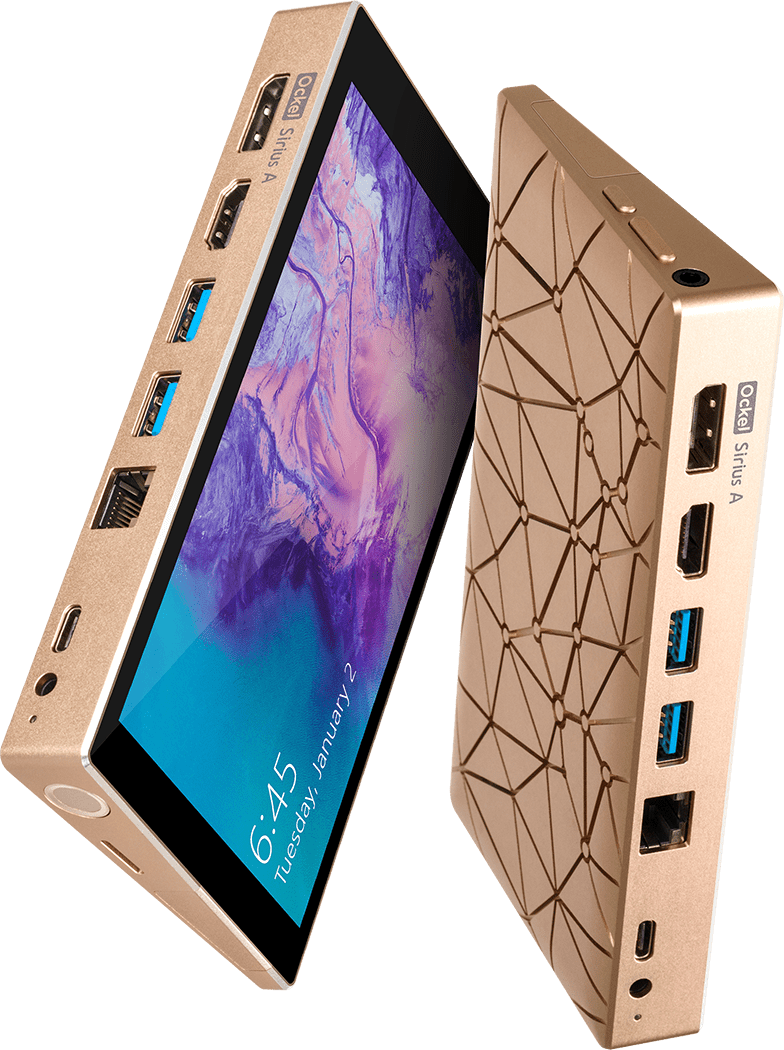
Sirius A
An ultra small PC with 6-inch touchscreen and battery for a full Windows 10 experience at any time.
https://www.ockelcomputers.com/sirius-a/
. This would add yet another piece of hardware to carry around.
You'd have to carry the transmitter around with you too anyway!
The Android phone solution was derived from my objective of getting a portable station. Yes, the transmitter has to be carried as well, but 2 pieces (phone and transmitter) are more portable than 3 (phone, some sort of ultra small computer and transmitter).
I do like that Sirius A. Pretty expensive though for what it is. I recognize that small means compromise, but an Atom processor? I doubt that you'd get much more heat generated from a mobile i3 or i5.
Maybe there are some similar Chinese sourced products that are cheaper. Mark pointed some 8 inch tablets out to me for around C$200. Maybe there are smaller ones.
And the scheduling is a big part of what I want to do. Never mind different playlists, but playing tags, jingles and the like.
If I just wanted to play music and go live with a mic, then the app BroadcastMySelf would probably do the trick.
We're getting a bit off topic, but here's a pocket pc that is more reasonably price.
There seem to be quite a few on AliExpress.

@artisan-radio That mini computer looks good! I got to look into that. You could end up doing what you want and be portable with a Windows mini PC or small 8" tablet if you can't get it to work on an Android phone. But i3 or i5? that needs cooling and will need a lot more power from the battery and won't come in these little things. But if you get that pocket PC you linked that I saw has a celeron processor, intel 5095, better than the 4000 series that is more than fine for running Salamandra. That's what my small computer I broadcast with has(celeron 4020) and operates flawlessly 24/7 365.
The compromise with the pocket computer I linked to, amongst other things, is screen space.
I was having difficulty navigating through the Windows Virtual Machine of Exagear on a 6.5 inch screen, never mind 5.5.
I'd prefer to have the computer a little bigger, and a little thinner. If you take a look at the video they have on the site, it consists of a single board. The thickness comes from the various external connectors (LAN, USB, etc.) and the battery.
There's lots on AliExpress from different vendors of different makes, so I'll keep searching for the 'perfect' one.
But in the meantime, I'm happy running Zara with the Sound Solution plug in for audio processing. I'm going to be doing an endurance test shortly, with a cobbled together event schedule.
But in the meantime, I'm happy running Zara with the Sound Solution plug in for audio processing. I'm going to be doing an endurance test shortly, with a cobbled together event schedule.
How well does the Compressor/limiter capabilities of the Sound Solution plugin work within the emulator software on your Android? ... And I thought you couldn't get Zara 1.4 to work.. isn't that the one that accepts plugins?
@artisan-radio That mini computer looks good! I got to look into that. You could end up doing what you want and be portable with a Windows mini PC or small 8" tablet if you can't get it to work on an Android phone. ...
It's $196 with free shipping, that is a good deal, but it's also an additional item to carry along whereas the cellphone is always on person anyway, which again goes against Artisan's primary objective.
Still, that's a sweet $200 deal, but how often would you ever use it? Great for a remote install I suppose but to be honest for that purpose you could get by a lot cheaper with a used mini-pc and 8" screen.. of course that eliminates the convenient to carry it around.
But yeah, that's really cool, I had no idea they could be got for that cheap. It would make a really unique and cool portable station.
... They have another model (looks the same) that's only $151 also with free shipping.